Under the Hood: How ContextOS Automates Database Provisioning
As engineers, we've all been there. We're cranking away on a solution to one of our everyday problems when the realization hits - we need a database. No big deal, right? We'll just spin one up with a single command, spend a few minutes on configuration, and get back to the actual work.
After all, databases are everywhere. They're an essential building block for businesses, automating the management of mission-critical data for everything from inventory and stock management to business intelligence and accounting. Surely provisioning one can't be that hard.
Then reality hits.
Let’s do a choose your own adventure: Traditional Path vs ContextOS Path
The Traditional Path: Up to 6 Weeks of Technical Complexity
Week 1: Planning & Architecture
Before even installing the database, we're making critical decisions that will haunt us for months:
- Capacity and Resource Planning: How many CPU cores? How much memory? What IOPS will we actually need? We're reading PostgreSQL documentation trying to calculate shared_buffers and effective_cache_size settings we've never tuned before.
- High availability decisions: Single instance or replica set? Streaming replication or logical replication? Do we need read-replicas? How many?
- Storage architecture: Which RAID configuration? What volume type? Do we need separate volumes for WAL files?
We're software engineers, not database architects. Yet here we are, making infrastructure decisions that will impact production performance for years.
Week 2: Infrastructure Provisioning
Now comes the fun part - actually building the thing:
Cloud Infrastructure (if we're lucky, 3-5 days):
- Provision compute instances with the right specs
- Configure VPCs and subnets across availability zones
- Set up security groups (which ports? which IP ranges?)
- Create and attach storage volumes
- Configure load balancers for HA setups
Network Configuration:
- Open firewall ports (which ones exactly?)
- Set up DNS entries
- Configure VPN or bastion hosts for secure access
- Set up network routing between replicas
Every cloud provider has different terminology. Every corporate network has unique requirements. What should be simple becomes a maze of documentation and Stack Overflow searches.
Week 3: Database Installation & Configuration
We've got servers. Now to actually make them into a database:
Installation:
bash
# Simple, right? Except which version?
# Which extensions do we need?
# What about dependencies?
apt-get install postgresql-15 # Wait... this is Debian, right?...
The Configuration Nightmare:
Now we're editing postgresql.conf with settings we're Googling as we go:
- max_connections - Too low and apps crash. Too high and we waste memory.
- shared_buffers - Should be 25% of RAM? Or was it 40%? Why are there five different recommendations?
- work_mem - Multiply this by max_connections and... wait, we might run out of memory?
- checkpoint_completion_target, wal_buffers, effective_io_concurrency - We're now reading PostgreSQL internals documentation at 11 PM.
Replication Setup:
If we want high availability (and we do), we're configuring streaming replication:
- Set up pg_hba.conf for replication authentication
- Configure recovery.conf (or is it standby.signal in newer versions?)
- Set up WAL archiving to somewhere
- Test failover procedures we hope we'll never need
Week 4: Security Hardening
Security can't be an afterthought:
SSL/TLS Configuration:
- Generate or procure certificates
- Configure PostgreSQL to require SSL
- Set up certificate validation
- Test that it actually works
Authentication & Authorization:
- Configure pg_hba.conf (again, differently this time)
- Create database users with proper permissions (what's the principle of least privilege for a database?)
- Set up connection pooling with PgBouncer (oh good, another service to configure)
- Maybe integrate with LDAP or Active Directory if corporate requires it
Audit & Monitoring Setup:
- Enable query logging (but not too much or we'll kill performance)
- Configure log shipping to wherever corporate logs go
- Set up log rotation before we fill up the disk
Week 5: Backup & Disaster Recovery
Now for the part that keeps us up – or wakes us up – at night:
Backup Strategy:
- Configure pg_basebackup for full backups
- Set up WAL archiving to S3 (or wherever)
- Install and configure pgBackRest or Barman
- Write scripts to run backups on schedule
- Set up retention policies
- Actually test restores (this always finds problems)
Disaster Recovery:
- Document failover procedures
- Script failover automation (probably with something we just learned)
- Set up monitoring for replication lag
- Configure automated failover (Patroni? Repmgr? Which one?)
- Test failover (it fails the first three times)
Week 6: Testing & Validation
Before we dare call this "production-ready":
Performance Testing:
- Generate realistic workloads (where do we even get those?)
- Run load tests with tools we just installed
- Discover our configurations are wrong
- Go back and retune everything
- Repeat until it doesn't fall over
Resilience Testing:
- Kill primary server, see if replica takes over (it doesn't, debug why)
- Simulate network partitions
- Test backup restores under load
- Fix all the things that broke
Application Integration:
- Update connection strings
- Test connection pooling under load
- Discover connection limit issues
- Retune configurations (again)
Ongoing: The Maintenance Treadmill
Congratulations! We've got a database! Now we get to keep it running forever:
Patch Management:
- Security CVE drops on Tuesday
- We have 30 days to patch or InfoSec escalates
- Plan maintenance window
- Write rollback procedures
- Execute patch (probably at 2 AM on a Sunday)
- Pray nothing breaks
The Accidental DBA Role:
We successfully patched the database once, so now we're "the database expert." Other engineers start asking us questions. We get pulled into incidents for databases we've never touched. Our performance review mentions "taking ownership of infrastructure."
We wanted to build features. Instead, we're monitoring replication lag, optimizing slow queries, and explaining to the new intern why transaction blocks matter and why they can't run UPDATE users SET without a WHERE clause.
The 3 AM Nightmare:
Eventually it happens. The primary goes down. Failover doesn't work automatically like we hoped. We're executing untested procedures at 3 AM, consulting documentation we wrote six months ago, hoping we remember how this works.
The ContextOS Way: Minutes, Not Months
What if I told you it didn't have to be this way?
What if standing up a production-ready PostgreSQL database took minutes instead of weeks?
What if redundancy, security, and disaster recovery were just... handled? Provided by a platform built by engineers that have built the world's largest and most complex infrastructures. A platform that provides infrastructure that is secure, scalable, and enterprise-ready from the start.
How ContextOS Actually Works
Getting Started (2 minutes):
Answer a few simple questions:
- What version of PostgreSQL do you want?
- What size database do you need? (Small, Medium, Large—we handle the capacity planning)
- What's your data classification? (We configure security accordingly)
That's it. No infrastructure decisions. No architecture debates. No reading PostgreSQL tuning guides at midnight. The team here at ContextOS has built thousands of infrastructures, so we already know what the settings, configurations, and decisions are, this is our wheelhouse.
What You Get Automatically:
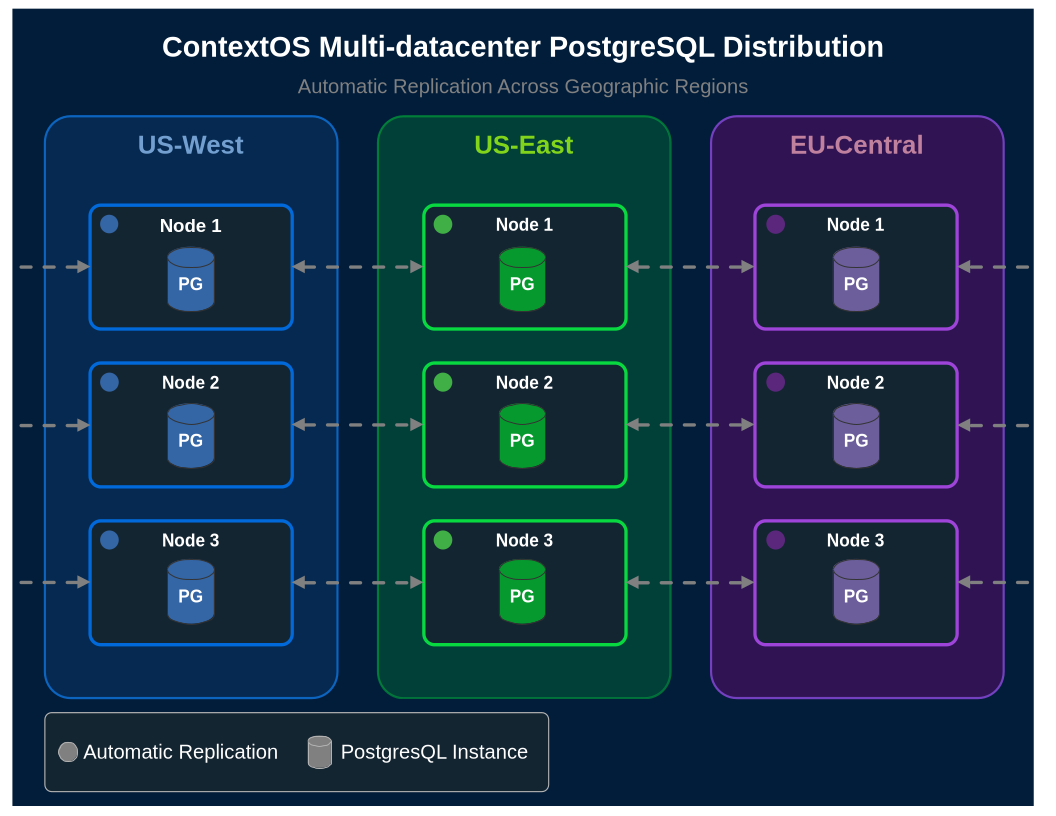
✓ Geographic Distribution: Your database is automatically distributed across multiple data centers. Not in one availability zone - across entire geographic regions. Failover is automatic and transparent.
✓ Security Built-In: Zero-Trust Bridge provides role-based access control from day-one. Every connection is authenticated and authorized. SSL/TLS is enabled. No firewall rules to open. No VPNs to configure. It just works, and it meets enterprise security requirements.
✓ Optimized Configuration: We've already done the capacity planning. shared_buffers, work_mem, max_connections - all tuned based on years of production experience, not Stack Overflow answers.
✓ Automated Backups: Continuous backup with point-in-time recovery. No scripts to write. No backup procedures to test. No 3 AM recovery drills. It's automatic.
✓ Zero Infrastructure Complexity: No YAML files. No Ansible. No Terraform. No Kubernetes manifests. No DNS configuration. No load balancer setup. We handle all the networking, port management, and infrastructure plumbing.

✓ Automatic Patching: Security updates are applied automatically during maintenance windows. No more 30-day patch countdown. No rollback procedures to write. We handle it.
The Real Difference
Traditional approach: 6 weeks of infrastructure work, followed by perpetual maintenance, patches, and the constant anxiety that disaster recovery might not actually work.
ContextOS: Answer a few questions. Get a production-ready, geographically distributed, automatically backed-up, security-compliant database in minutes.
You're not an accidental DBA anymore. You're not the database expert by default. You're not spending 20% of your time on patch management and backup strategies.
You're writing code. Building features. Solving business problems.
You know, the job you actually signed up for.
Getting Started
If you're tired of weeks-long provisioning timelines, accidental DBA roles, and untested disaster recovery plans - ContextOS might be exactly what you need.
No six-week timeline required. No infrastructure expertise necessary. Just databases that work the way you always wished they would.
You've spent enough time fighting with database provisioning. It's time to get back to building great software.